Showing posts with label HOWTO. Show all posts

Sunday, June 26, 2016

Make a PowerPoint deck to a specific resolution (1024x768)

I wanted to capture some screenshots and save them to a presentation in *exactly* the format that they were recorded.  Unfortunately I couldn't figure out how to get PowerPoint to set itself to a specific page size other than by Imperial (inches) or Metric (centimeters) measurements.  As such I employed the free LibreOffice Impress.

  1. Start the program and launch Impress
  2. Modify the size standard by going to the menu and selecting Tools - Options and then LibreOffice Impress - General
  3. Under Unit of Measurement choose Point
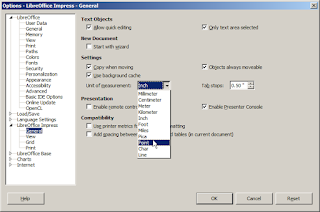
  4. Click OK and you will return to the main Impress screen
  5. From the menu, select Format - Page
  6. In the Page Setup window, modify the Width and Height (in this case 1024x768)
  7. Click OK and return to the main Window
Finally, just for the rest of my team who uses PowerPoint, I exported this to the PPTX format but you can do most of this the same in PowerPoint.

Download LibreOffice.

Wednesday, June 22, 2016

Path portability when setting file associations (LibreOffice Portable)

Issue: 

I ran LibreOffice on a Win7x64 machine and did a manual association of .ODT files with it (the "Open with ..." operation).  Then, when the LibreOffice folder moved, I couldn't re-set the file association.

Resolution:

Open regedit and delete the entire .odt key: HKEY_CURRENT_USER\Software\Microsoft\Windows\CurrentVersion\Explorer\FileExts\.odt

(solution source)

---

More background:

I had OpenOffice installed, opening ODT files by default.  In an effort to fix a problem with OpenOffice quickly, I downloaded the "LibreOffice Still" Portable version to my Downloads folder and set it as the default viewer.  I later moved it to another folder (where all my other portable applications are located) and just couldn't fix the old association.

Related:

More on LibreOffice "Still"